Eleven months ago I published A Turn-Key, Hardened WireGuard Stack for Debian 13. It introduced WGX — "WireGuard eXtended" — which was an installer: Bash scripts behind a text menu that turned a fresh Debian 13 server into a VPN, with a third-party web console in front of it and the firewall, fail2ban, TLS, backups and health checks wired up around the lot.
It worked. Then we dropped it.
This weekend it came back as something else entirely. WGX is now a WireGuard server of its own, written from scratch in Go, and as of today it has a new name: ihasvpn. Nothing from the installer was carried over except the intent, and it is a far better piece of software than the one that article described.
An installer was the wrong shape
The trouble with the old WGX was not any one of the pieces. It was the shape.
An installer owns the machine rather than the product. It lands firewall rules, packages, systemd units, a reverse proxy and a web console on your host, and from that moment you are maintaining all of it. It assumed one release of one distribution. Updating meant re-running scripts and hoping the server still looked the way they expected it to. And the part you touched every day — the console — belonged to another project. Ours was the scaffolding around it.
So the rewrite started from a different question. Not "how do I set up a VPN on a server", but "what is the smallest thing that is a VPN server, with a console I would actually want to use?"
One binary, one container
The answer is a single static Go binary in a container of about 50 MB, for both amd64 and arm64. It:
- drives the kernel's own WireGuard over netlink — it creates the interface, programs the peers and reads their counters every two seconds, with no scripts in between;
- falls back to wireguard-go in userspace on a host without the kernel module, and says so on the dashboard rather than quietly running slower;
- writes its own NAT rules into an nftables table of its own and checks the forwarding sysctls at startup, showing anything the container was not allowed to set;
- keeps everything in one SQLite file — devices, keys, settings, usage history — so that file is the whole backup;
- serves the console from the same binary, a React app embedded at build time.
There is no reverse proxy to configure, no firewall framework to install and no packages added to your host, and in the standard setup nothing is written to the host's configuration at all. Updating is replacing the container.
It is about 5,400 lines of Go and 2,700 of TypeScript, with a short dependency list: the WireGuard control library, netlink, a pure-Go SQLite, the Go crypto packages and a QR code generator. It is licensed AGPL-3.0; the installer was GPLv3.
The console is the product now
This is the part that makes it genuinely more fun to run.
- Add a device in a minute. Give it a name; ihasvpn makes the keys, picks an address and shows a QR code for the WireGuard app. Or let the device make its own keys and hand over only the public half, so the private key never leaves it.
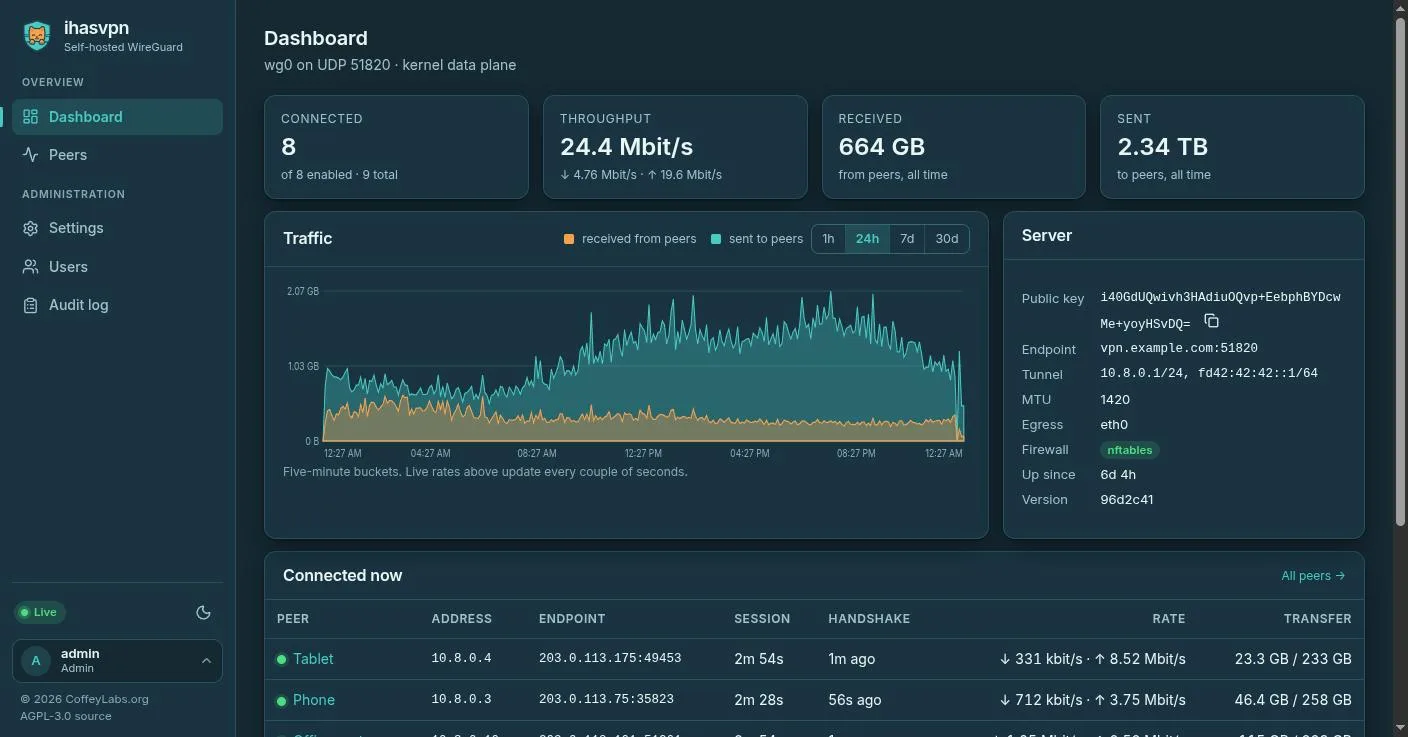
- See who is connected. Where each device is connecting from, its last handshake, how long it has been on and how fast it is moving data, live.
- Cut anyone off. Disconnect keeps a device out until you let it back in. Reset session makes it reconnect from scratch. Neither needs a restart.
- Access that ends on time. Give a guest an expiry date and they are disconnected when it comes. Lost a laptop? Rotate its keys with one click.
- Know what happened. Ninety days of usage per device, and an audit log of every change — including every time somebody opened a device's configuration.
- Locked down. No default password: the first administrator is created at setup. Two-factor sign-in with recovery codes, viewer and administrator roles, and Prometheus metrics behind a token.
It is dark by default, light if you ask, and it has a proper phone layout, because the moment you most want to disconnect a device is rarely the moment you are sitting at a desk.
Fast, because the kernel does the work
With the tunnel on the kernel data plane, iperf3 between two containers on my workstation ran at 6.6 Gbit/s through it. That is one machine with no internet in the way, so it is not a number you will see across a real link. What it tells you is that the software is not the bottleneck. Your uplink will be.
The other half of "fast" is the problem nobody diagnoses: connected, but pages never load. That is almost always packets too big for the tunnel, and ihasvpn clamps TCP segment sizes to fit by default, so it does not happen in the first place.
The IPv6 lesson, on day one
The first evening it ran in production, my laptop connected and IPv4 went through the tunnel — while every IPv6 connection went straight out to my ISP.
The client configuration asked for everything, IPv4 and IPv6 alike, but the server had only handed out an IPv4 address. NetworkManager, reasonably, imported that as "IPv6 disabled" and never installed the IPv6 route. A different client would have done the opposite and sent IPv6 into a tunnel with nowhere to take it. Neither is a bug in a client. The configuration promised a route with no address behind it.
The fix was to carry IPv6 inside the tunnel properly: turn on an IPv6 range and every device gets an address from it alongside its IPv4 one, and the server forwards both. It is one setting, and it is on for mine. The general point is worth stating plainly: on most networks today, an IPv4-only full-tunnel VPN is a half-tunnel VPN, and it will not tell you.
Why the new name
WGX was a fine name for an installer. It turns out to also be the name of several other WireGuard tools, and a project that spends its life being mistaken for someone else's is not doing either of them any favours.
So it is ihasvpn, and it sits deliberately next to ihasmail: same family, same idea — one container that does its job well, with nothing else to run. The logo is ihasmail's cat, peering over the edge of a shield instead of an envelope, and the console wears ihasmail's colours.
Renaming a project is cheap exactly once, before anybody depends on it. The only person whose environment variables changed was me.
If you followed the old article
The installer is gone, and the old repository address now forwards to ihasvpn — which shares nothing with it but the goal — so the clone and install commands in that article no longer apply. There is nothing to migrate either: a fresh ihasvpn is one compose file, and the quick start walks through it in a few minutes. And if a different setup fits your server better, run that.
Try it
- Project site: ihasvpn.org
- Source: git.coffeylabs.org/coffey-labs/ihasvpn
- Image:
registry.coffeylabs.org/coffey-labs/ihasvpn
Bug reports, ideas and patches are all welcome on GitHub.