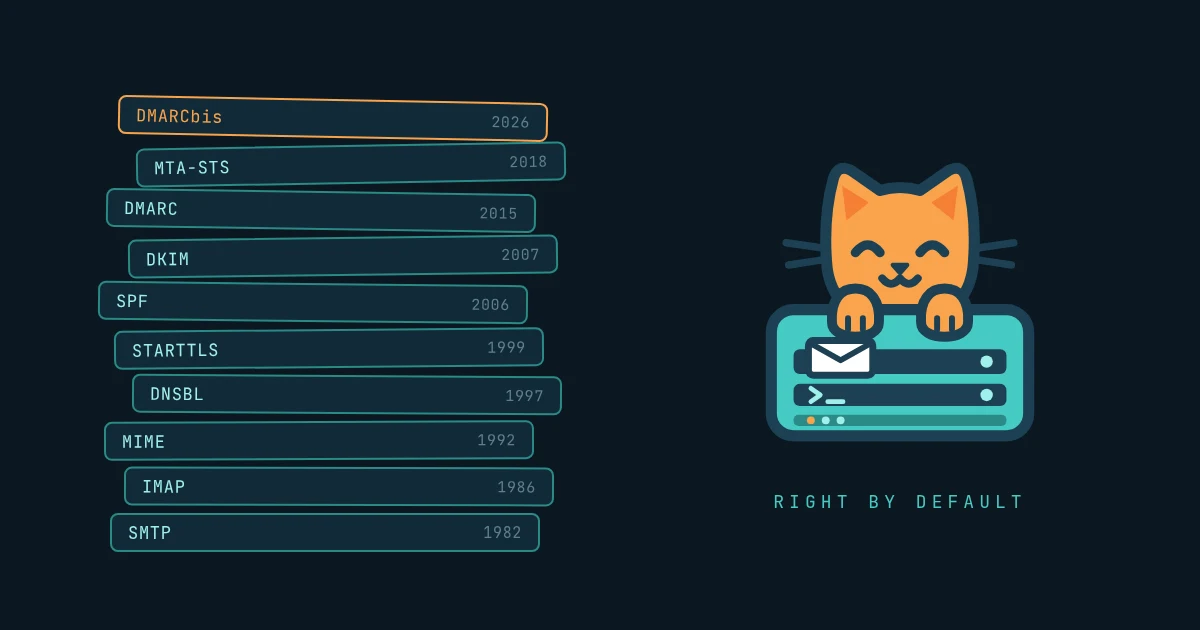
Email is a simple idea: an address, a message, and servers that pass it along until it arrives. Running a mail server that the rest of the internet will actually trust is one of the hardest routine jobs in infrastructure. No single piece is especially difficult. The trouble is forty years of pieces stacked on top of each other.
Built on trust, patched for distrust
SMTP was designed in 1982 for a few hundred friendly hosts. Any server relayed for anyone, and the From: line was whatever the sender typed. That assumption never changed. Instead, every new problem got a new layer: MIME for attachments, IMAP for folders, blocklists when spam arrived, SPF and DKIM when spoofing arrived, DMARC to tie them together, TLS when surveillance became a concern.
None of these replaced what came before. Each one is optional on paper and mandatory in practice, because the big mailbox providers enforce them. DMARC spent eleven years as an Informational RFC before the IETF published it as a Proposed Standard, RFC 9989, in May 2026. Some existing records already need edits to keep up.
So many DNS records
A properly configured mail domain today publishes around a dozen kinds of DNS records: MX, SPF, DKIM, DMARC, MTA-STS, TLS-RPT, TLSA, BIMI, autodiscover and more. Each has its own syntax and its own way of failing silently. SPF breaks past ten lookups. DKIM keys never get rotated. DMARC sits at p=none forever while its reports pile up unread. Nothing throws an error. Mail just goes to spam.
Then there is the record you don't control. Reverse DNS maps an IP address back to a name, and receivers reject mail from IPs that don't have a proper one. But the reverse zone belongs to whoever owns the IP, not to you. On a cloud VM it's a console setting or a support ticket. On a residential line it's usually impossible. A reverse name proves nothing by itself, so receivers also require that name to resolve back to the same IP, which means your zone and your provider's zone have to agree. Change hosts and it's gone. Forward DNS is a record you publish. Reverse DNS is a favor someone else does for you.
Proving who you are
A message carries at least three identities: the connecting IP, the envelope sender, and the From: address the reader sees. SPF checks the first two. DKIM checks a signature from any domain at all. Only DMARC checks the address a human actually reads.
Forwarding breaks SPF. Mailing lists break DKIM. Perfectly legitimate mail fails both and gets rejected. Doing it right means signing everything, aligning every third-party sender, reading the reports, and tightening policy in careful steps.
Guilty until proven innocent
Passing authentication proves identity, not trustworthiness. New IPs and domains have no reputation, cloud ranges come pre-tainted by other people's abuse, and every blocklist has its own rules.
Google and Yahoo began enforcing bulk-sender rules in 2024, and Microsoft followed in May 2025: aligned authentication, valid reverse DNS, TLS, one-click unsubscribe, and complaint rates under 0.3%. Microsoft rejects non-compliant mail outright. Meanwhile inbound spam never stops, and one phished account can burn months of reputation in a single night.
Security, law and now AI
A mailbox holds the password resets for everything else a person owns, so every listener needs certificates, strong authentication, brute-force protection and prompt patching.
Once a business runs on email, the mailbox is also legal evidence. That means retention periods, litigation holds that override deletion, eDiscovery exports, audit logs, and privacy laws that conflict with all of the above.
AI adds a layer on both sides. Attackers write fluent, personalized phishing at scale. Defenders rely on opaque classifiers. And users want assistants reading their mail, which raises new questions: where does the data go, what counts as a record, and can a malicious email give instructions to the AI reading it?
All of it has to be watched every day, because most mail failures are silent. "I didn't get the email" is still the most common ticket in IT.
Where inbuxa comes in
inbuxa won't make email simple again. Nothing will. What it does is turn those forty years of layers into correct defaults, loud checks, and a short list of decisions only a human can make.
One mail server instead of a stack. A single Rust binary serves SMTP, submission, IMAP, POP3, JMAP, ManageSieve, CalDAV, CardDAV and WebDAV, with one configuration and one user directory. The console and the webmail, built from ihasmail, are separate programs that talk to it over JMAP, so there's no extra database and no web stack welded to the mail host. Autoconfig and autodiscover set up desktop and mobile clients automatically.
DNS written for you, then checked. The console generates the exact MX, SPF, DKIM, DMARC, MTA-STS, TLS-RPT and TLSA records for each domain, then checks every one against public DNS and tells you which are live, which differ and which are missing. Connect a supported DNS provider and it publishes the records itself, including new DKIM keys when they rotate.
Authentication and security by default. DKIM keys are generated per domain and every outbound message is signed. Certificates renew automatically on every listener, and MTA-STS and DANE are supported. Accounts get app passwords and directory integration, and brute-force attackers are banned automatically.
Reports you'll actually read. DMARC and TLS aggregate reports are parsed into the console instead of piling up in a mailbox nobody opens.
Spam and abuse handled in both directions. A built-in filter combines blocklists, authentication results, Bayesian scoring and per-user training. Outbound rate limits and queue throttles keep one bad login from becoming a spam run, and rejecting at SMTP time avoids backscatter.
The legal side, built in. Litigation holds that override deletion and stay invisible to outsiders, an audit log, account lock and delegation for when someone leaves, and undelete for the mail that shouldn't have gone. A Compliance area in the console adds an inventory of where personal data lives, and a compliance role that can place and release holds without full administrator rights.
AI on your terms. The spam filter can take a language model's opinion as one signal among many. It's off in a new install and built for a model you host and can audit, so mail doesn't go to a third-party model unless you choose to send it there. I covered the details in inbuxa Is Here.
What stays with you. Reverse DNS and IP reputation belong to your provider. Reputation is earned over time. Retention policy is your organization's decision. inbuxa can't publish your PTR record, can't skip the warm-up, and can't decide how long you keep mail. What it can do is make sure everything else is already right when you get there.
Email will never be simple again. With inbuxa, it can at least be right by default.
The site is inbuxa.org, the documentation is at docs.inbuxa.org, and the source is at git.coffeylabs.org/inbuxa/inbuxa-server.