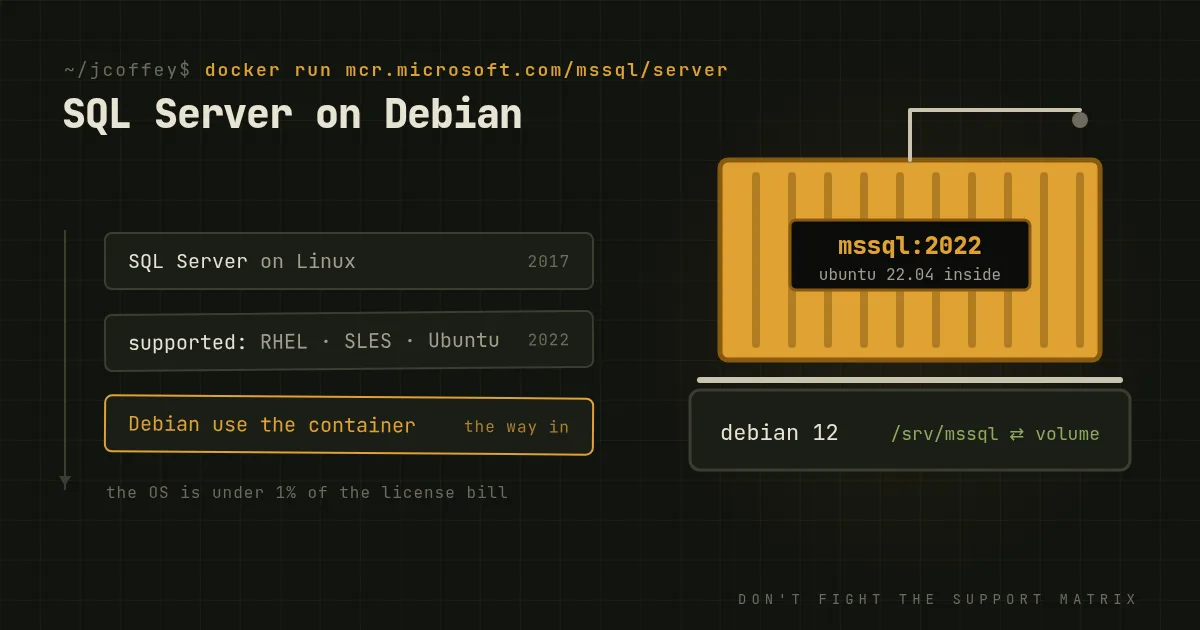
Microsoft shipped SQL Server on Linux in 2017. It's the same database engine, not a port or a cut-down edition. Microsoft added a platform abstraction layer underneath it so the engine runs on Linux with nearly everything intact. If your organization runs on Linux and has one Windows box left because "the database needs it," that box is optional now.
I'm a Debian person, so this is the setup I'd want. But I'm going to start with the two things most articles on this leave out, because they change how you should do it.
Catch one: Debian isn't supported
Microsoft supports SQL Server 2022 on three Linux distributions: Red Hat Enterprise Linux, SUSE Linux Enterprise Server and Ubuntu. Debian isn't on the list. Microsoft publishes packages for those three only, and support cases on anything else can be closed with "please reproduce on a supported platform."
You can install the Ubuntu packages on Debian, and people do. Sometimes it works, until a library version on Debian doesn't match what the package expects. For a production database, "sometimes it works" isn't a plan.
The fourth supported option is the one that makes Debian work: containers. Microsoft supports its official SQL Server container images on Docker Engine on any Linux host with an x86-64 CPU. The image carries its own userland, so the host distribution doesn't matter. Debian runs Docker or Podman very well.
Catch two: the Windows license isn't the expensive part
The usual pitch is that you save on Windows licensing. True, but small. SQL Server itself is licensed per core, whichever OS it runs on. At current list prices, Enterprise edition costs about $15,000 for every two cores, and Standard about $4,000. A Windows Server Standard license for a 16-core machine is roughly $1,000. On a 16-core database server running Enterprise, the operating system is well under one percent of the bill.
So move to Linux for operational reasons, not savings. And if cost is the real problem, the question to ask is whether you need SQL Server at all, or whether PostgreSQL would do the job. That's another article.
The good reasons
- One platform to run. If your fleet is Linux, the database is no longer the odd machine out. Same patching, same configuration management, same monitoring, same people.
- Containers and automation. Spinning up a test instance becomes
docker run, with the same version as production, in seconds. CI pipelines can test against a real SQL Server instead of a mock. - A smaller host. A minimal Debian install with nothing but Docker, SSH and your monitoring agent has far less running on it, and far less to patch, than a Windows Server install.
- Better tooling for the box itself.
systemd,journald,perf,iostatand the rest of the Linux toolkit for understanding what the host is doing.
What doesn't come along
Check this list before you migrate:
- SQL Server Analysis Services and Reporting Services don't run on Linux. If you use them, they stay on Windows. Integration Services runs, but with limitations.
- Windows authentication needs setup. Active Directory logins work, but you have to join the host to the domain or configure a keytab. It's documented and works fine. It's just not automatic.
- A few engine features are Windows-only, like FileTable and some kinds of distributed transactions. Microsoft keeps an up-to-date list of unsupported features in its release notes. Read it against your schema.
- Tools. SQL Server Management Studio is Windows-only. Use Azure Data Studio, VS Code with the SQL extension, or
sqlcmd, or keep SSMS on an admin workstation and connect remotely.
Doing it on Debian
The short version, on a Debian 12 host:
-
Install Docker or Podman from Debian's repositories or Docker's own.
-
Give the data its own volume, on XFS or ext4, ideally on a dedicated disk. Never keep the database inside the container's writable layer.
-
Run the official image, pinned to a specific cumulative update rather than
latest, so upgrades happen when you choose:docker run -d --name mssql --restart unless-stopped \ -e ACCEPT_EULA=Y -e MSSQL_PID=Standard \ --env-file /etc/mssql/mssql.env \ -e MSSQL_MEMORY_LIMIT_MB=24576 \ -v /srv/mssql:/var/opt/mssql \ -p 127.0.0.1:1433:1433 \ mcr.microsoft.com/mssql/server:2022-CU13-ubuntu-22.04The SA password goes in
/etc/mssql/mssql.envasMSSQL_SA_PASSWORD=..., readable by root only, so it stays out of your shell history. Bind the port to localhost or a private interface, never to the whole internet. -
Set the memory limit. By default SQL Server takes 80 percent of the memory it can see. Leave room for the host and the page cache.
-
Back up with SQL Server's own backups,
BACKUP DATABASEto a mounted path, then copy those files off the host. A snapshot of a running database's files isn't a backup. -
Monitor it with your usual stack. There are good Prometheus exporters for SQL Server.
MSSQL_PID sets the edition. Developer is free for non-production use and has every Enterprise feature. Express is free in production but limited to 10 GB per database. Anything else needs the license you'd buy on Windows.
Should you?
If your shop runs Debian and has to keep SQL Server, yes: run it in Microsoft's container on a Debian host, and you get a supported database on the platform you know. If you'd rather install SQL Server natively without containers, use Ubuntu LTS or RHEL. Don't fight the support matrix to save a distribution argument.
And if the reason you're reading this is that the license bill hurts, look hard at whether the application really needs SQL Server. Plenty of them don't.
Since then
Added October 2026. SQL Server 2025 has shipped, and its Linux support extends to RHEL 10 and Ubuntu 24.04. The container route on Debian works the same way, with a newer image tag. Azure Data Studio was retired in February 2026, so on Linux the tool to use is now VS Code with Microsoft's MSSQL extension.