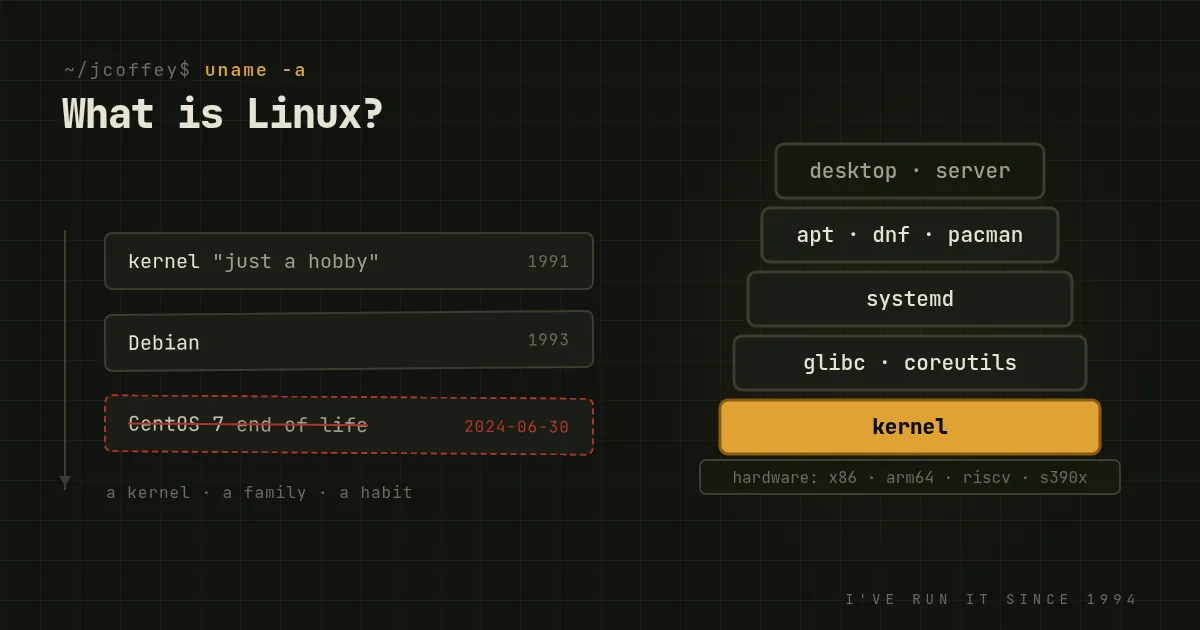
Strictly speaking, Linux is a kernel: the core program that talks to the hardware, decides which process runs next, manages memory, and keeps one program from trampling another. Linus Torvalds started writing it in 1991 as a student in Helsinki and announced it as "just a hobby." He still maintains it, along with thousands of other people working for hundreds of companies, and a new version comes out roughly every nine weeks.
Loosely speaking, which is how almost everyone uses the word, Linux is a whole family of operating systems built around that kernel. That's the one I mean for the rest of this article. I've been running it since 1994, and I still think it's the most useful thing a person in IT can learn.
The parts
A Linux system is a stack of separately developed pieces that a distribution assembles, tests and ships together.
- The kernel. Hardware drivers, the scheduler, memory, filesystems, networking, security controls. Everything else asks the kernel for what it needs.
- The C library and core tools. Programs don't talk to the kernel directly. They go through a C library, usually GNU's glibc, and use the GNU utilities for the basics:
ls,cp,grep, the shell. That's why the Free Software Foundation argues the system should be called GNU/Linux, and why the argument is still going. - An init system. The first process the kernel starts, which starts everything else and supervises it. On most distributions today that's systemd.
- A package manager. This is the part that makes a distribution a distribution.
apton Debian and Ubuntu,dnfon Fedora and Red Hat,pacmanon Arch. One command installs software along with everything it depends on, and another updates the whole system at once, from the kernel up, from sources the distribution signs. - Everything else. Optionally a graphical desktop such as GNOME or KDE Plasma, plus whatever the machine is for: a web server, a database, a browser, a game.
Because every one of those pieces is open source, anyone can assemble them differently. That's why there are hundreds of distributions, and why most of them are variations on a few families.
You already use it
Most people who say they've never used Linux use it every day.
- Your phone, if it runs Android, which most phones do. Android is the Linux kernel with Google's software on top.
- The websites you visit. The large majority of web servers run Linux, and so does nearly every cloud. When you rent a server from AWS, Google, Azure or anyone else, Linux is the default choice.
- Your router, your TV and your car, which probably all run an embedded Linux somewhere.
- The fastest computers on Earth. Every one of the top 500 supercomputers has run Linux since 2017.
- A growing share of desktops and handhelds, from developers' laptops to Valve's Steam Deck, which runs a Linux-based SteamOS and has done more for Linux gaming than a decade of advocacy.
Why people choose it
- It's free, in both senses. No license fee, and the freedom to read, change and share the code. Nobody can revoke it.
- You can see what it's doing. Logs are text files, configuration is text files, and every process is visible. When something breaks, you can usually find out why, and that matters more than any feature list.
- It's stable. Linux servers run for years. Updates rarely require a reboot except for a new kernel, and live patching can often avoid even that.
- It's secure by default, mostly. User separation, a mature permission model, SELinux or AppArmor, and a security team for every major distribution that ships fixes quickly. It isn't invulnerable, but it was built for many users on one machine from the start.
- It runs on almost anything. From a Raspberry Pi to a mainframe, and on hardware your old operating system no longer supports.
- The skills transfer. Learn Linux once and you can work on cloud servers, containers, embedded devices and supercomputers. That's a better career investment than almost any single product certification.
Picking a distribution
There are hundreds, but you only need to know a few families:
- Debian is the community-run elder statesman, released when it's ready and famously stable. It's what I run on servers, and it's the base of a large share of the others.
- Ubuntu is Debian-based and backed by Canonical, with long-term support releases every two years. Version 24.04 LTS came out in April. It's the most common choice in the cloud and a good first desktop.
- Linux Mint is Ubuntu-based and aimed squarely at people coming from Windows, with a familiar layout and very little friction.
- Fedora is sponsored by Red Hat, current and well engineered. It's where much of what ends up in Red Hat Enterprise Linux appears first.
- Red Hat Enterprise Linux and its rebuilds, Rocky Linux and AlmaLinux, are what much of corporate IT runs, with ten years of support per release.
- Arch Linux is a rolling release you assemble yourself, with arguably the best documentation in the Linux world.
Today is also a small milestone. CentOS Linux 7 reaches end of life on June 30, 2024. For a decade CentOS was the free rebuild of Red Hat Enterprise Linux that half the internet's servers ran. Red Hat turned it into CentOS Stream, an upstream preview rather than a downstream rebuild, and CentOS 8 was cut short in 2021. Version 7 was the last of the old line. If you still have CentOS 7 machines tomorrow, they're running without security updates. Rocky and Alma are the usual next homes for them, or Debian if you're starting fresh.
If you just want to try Linux on a desktop, start with Mint or Ubuntu from a USB stick without installing anything. My longer advice is in the beginner's guide to choosing a distribution, and the backstory is in the history of Unix and Linux.
Since then
Added October 2026. Linux turned 35 last week, and I wrote about it in Just a Hobby. Debian 13 "trixie" came out in August 2025. When Windows 10 support ended that October, the Linux desktop got a wave of curious newcomers.